I wanted to download a CSV file from a URL, process it in Spark, and perform some data analysis to identify trends. Specifically, I aimed to analyze air travel data from the years 1958, 1959, and 1960, and find the month with the highest travel numbers in 1958. I executed this task on my local machine using Apache Spark's spark-shell, which provides a Scala-based interactive shell for working with Spark.
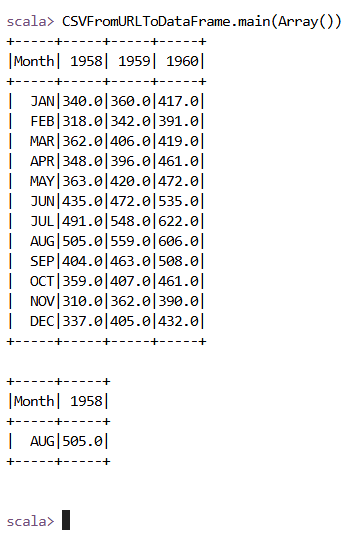
To begin, I initialized a Spark session and imported necessary libraries like org.apache.commons.io.IOUtils, java.net.URL, and org.apache.spark.sql. I then defined a URL to fetch the CSV file, used IOUtils to read the content into a string, and saved this content to a temporary file. I loaded the CSV file into a Spark DataFrame, cleaned the column names by removing extra spaces and quotes, and cast the travel data columns to numeric types for proper analysis. After that, I performed a query to filter the data for the year 1958 and sorted it by the number of travels to find the month with the highest travel volume. Finally, I displayed the cleaned DataFrame and the result using show() before stopping the Spark session. The process ran, and I was able to identify that August 1958 had the highest travel numbers with 505.0 passengers.
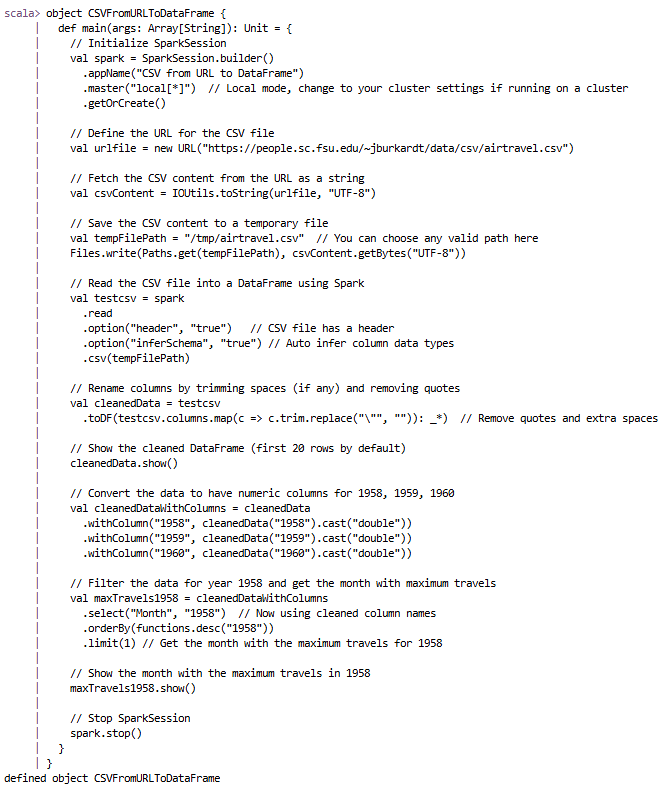
I initialized a Spark session, imported the necessary libraries, and fetched the CSV file from the provided URL.
Next, I loaded the CSV file into a Spark DataFrame using Spark's read method, ensuring the header was considered and the schema was inferred automatically.
After loading the data, I cleaned the column names by trimming spaces and removing quotes. I then cast the travel data columns to numeric types for easier analysis. Finally, I filtered the data for the year 1958 and found the month with the highest travel numbers.
Finally, I executed the process, fetched the results, and displayed the month with the highest travel numbers in 1958.
// Import necessary libraries
import org.apache.commons.io.IOUtils
import java.net.URL
import org.apache.spark.sql.{SparkSession, functions}
import java.nio.file.{Files, Paths}

// Define the object containing the main method
object CSVFromURLToDataFrame {
  def main(args: Array[String]): Unit = {
    // Initialize SparkSession
    val spark = SparkSession.builder()
      .appName("CSV from URL to DataFrame")
      .master("local[*]")  // Local mode, change to your cluster settings if running on a cluster
      .getOrCreate()

    // Define the URL for the CSV file
    val urlfile = new URL("https://people.sc.fsu.edu/~jburkardt/data/csv/airtravel.csv")

    // Fetch the CSV content from the URL as a string
    val csvContent = IOUtils.toString(urlfile, "UTF-8")

    // Save the CSV content to a temporary file
    val tempFilePath = "/tmp/airtravel.csv"  // You can choose any valid path here
    Files.write(Paths.get(tempFilePath), csvContent.getBytes("UTF-8"))

    // Read the CSV file into a DataFrame using Spark
    val testcsv = spark
      .read
      .option("header", "true")   // CSV file has a header
      .option("inferSchema", "true") // Auto infer column data types
      .csv(tempFilePath)

    // Rename columns by trimming spaces (if any) and removing quotes
    val cleanedData = testcsv
      .toDF(testcsv.columns.map(c => c.trim.replace("\"", "")): _*)  // Remove quotes and extra spaces

    // Show the cleaned DataFrame (first 20 rows by default)
    cleanedData.show()

    // Convert the data to have numeric columns for 1958, 1959, and 1960
    val cleanedDataWithColumns = cleanedData
      .withColumn("1958", cleanedData("1958").cast("double"))
      .withColumn("1959", cleanedData("1959").cast("double"))
      .withColumn("1960", cleanedData("1960").cast("double"))

    // Filter the data for year 1958 and get the month with maximum travels
    val maxTravels1958 = cleanedDataWithColumns
      .select("Month", "1958")  // Now using cleaned column names
      .orderBy(functions.desc("1958"))
      .limit(1) // Get the month with the maximum travels for 1958

    // Show the month with the maximum travels in 1958
    maxTravels1958.show()

    // Stop SparkSession
    spark.stop()
  }
}

// Call the main function
CSVFromURLToDataFrame.main(Array())
Below are screenshots showing the code execution in the terminal: