Analyzing CSV Data from a URL with Apache Spark SQL Queries
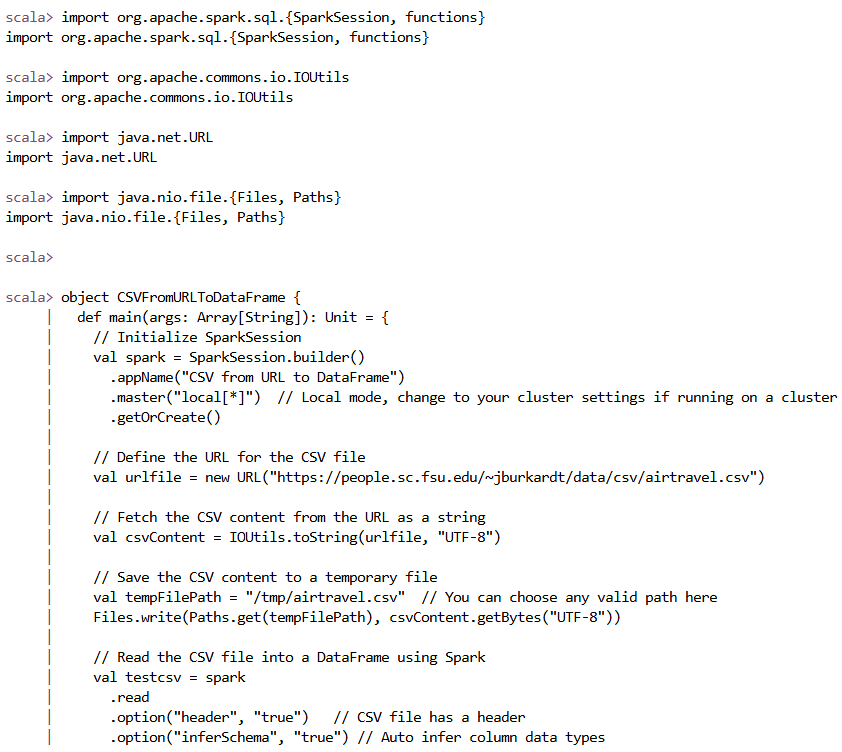
In this example, I aimed to load a CSV file from a URL, clean and process the data using Apache Spark, and run a few SQL queries to analyze it. Here's what I did step by step:
Step 1: Set Up SparkSession
I started by setting up a SparkSession. This is a required step for using Spark's DataFrame and SQL functionalities.
                val spark = SparkSession.builder()
                    .appName("CSV from URL to DataFrame")
                    .master("local[*]")  // Running locally; for a cluster, adjust this line
                    .getOrCreate()
Step 2: Define the URL for the CSV File
Next, I defined the URL pointing to the CSV file I wanted to load. In this case, I used a sample CSV file about air travel data.
val urlfile = new URL("https://people.sc.fsu.edu/~jburkardt/data/csv/airtravel.csv")
Step 3: Fetch the CSV Content from the URL
To fetch the CSV file's content, I used the IOUtils class from Apache Commons IO. This class allows me to convert the content of the file at the given URL into a string.
val csvContent = IOUtils.toString(urlfile, "UTF-8")
Step 4: Save the CSV Content to a Temporary File
Once I had the CSV content, I saved it to a temporary file on the local filesystem. I used java.nio.file.Files to write the content to a file.
                val tempFilePath = "/tmp/airtravel.csv"
                Files.write(Paths.get(tempFilePath), csvContent.getBytes("UTF-8"))
Step 5: Load the CSV into a DataFrame
With the CSV file saved locally, I read it into a Spark DataFrame. I specified options like header (since the CSV has headers) and inferSchema (to automatically detect the data types of columns).
                val testcsv = spark
                    .read
                    .option("header", "true")
                    .option("inferSchema", "true")
                    .csv(tempFilePath)
Step 6: Clean the Data
I noticed that the column names might have unwanted spaces or quotes, so I cleaned them by trimming spaces and removing any quotes.
                val cleanedData = testcsv
                    .toDF(testcsv.columns.map(c => c.trim.replace("\"", "")): _*)
Step 7: Show the DataFrame and Schema
To verify that the data looked correct, I displayed the first few rows and printed the schema.
                cleanedData.show()
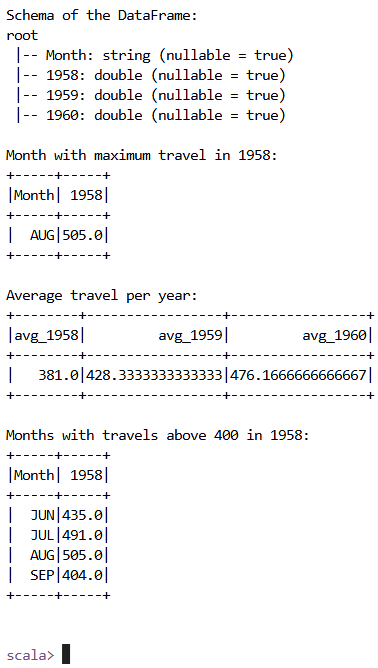
                cleanedData.printSchema()
Step 8: Convert Columns to Numeric Types
Since the columns for the years 1958, 1959, and 1960 contained numeric data but were stored as strings, I cast these columns to double for numerical analysis.
                val cleanedDataWithColumns = cleanedData
                    .withColumn("1958", cleanedData("1958").cast("double"))
                    .withColumn("1959", cleanedData("1959").cast("double"))
                    .withColumn("1960", cleanedData("1960").cast("double"))
Step 9: Create a Temporary SQL View
I created a temporary view of the cleaned data so that I could run SQL queries on it.
cleanedDataWithColumns.createOrReplaceTempView("airtravel_data")
Step 10: Run SQL Queries
I wrote several SQL queries to analyze the data. First, I queried for the month with the highest travel in 1958.
                val maxTravels1958 = spark.sql("""
                  SELECT Month, `1958`
                  FROM airtravel_data
                  ORDER BY `1958` DESC
                  LIMIT 1
                """)
                maxTravels1958.show()
Then, I ran another query to compute the average travel for each year (1958, 1959, 1960).
                val averageTravelPerYear = spark.sql("""
                  SELECT
                    AVG(`1958`) AS avg_1958,
                    AVG(`1959`) AS avg_1959,
                    AVG(`1960`) AS avg_1960
                  FROM airtravel_data
                """)
                averageTravelPerYear.show()
Finally, I filtered records where the travel in 1958 was greater than 400.
                val travelsAbove400 = spark.sql("""
                  SELECT Month, `1958`
                  FROM airtravel_data
                  WHERE `1958` > 400
                """)
                travelsAbove400.show()
Step 11: Stopping the SparkSession
After finishing the analysis, I stopped the SparkSession to free up resources.
spark.stop()
Results
- Cleaned Data: The data was successfully loaded and cleaned.
- Month with Maximum Travel in 1958: August had the highest travel in 1958.
- Average Travel per Year: The average travel for 1958 was 381, for 1959 was 428.33, and for 1960 was 476.17.
- Months with Travels Above 400 in 1958: June, July, August, and September had more than 400 travels in 1958.
Images